
Dot Link - Connect the Dots
BluetilePuzzle
4.814.45K Reviews
- Version
- 3.3.0
- Installs
- 10.00M
- Age Rating
- Everyone
Screenshots
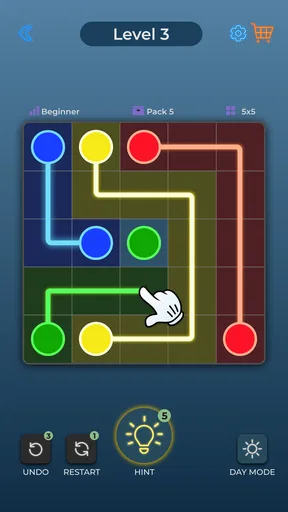
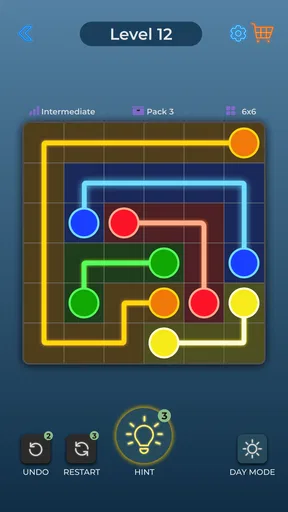
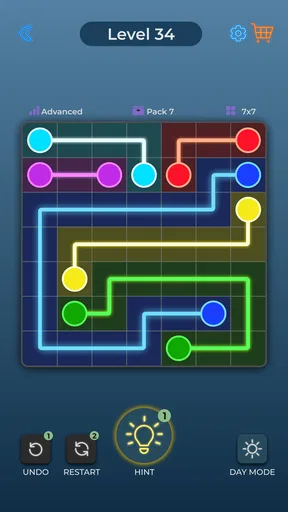

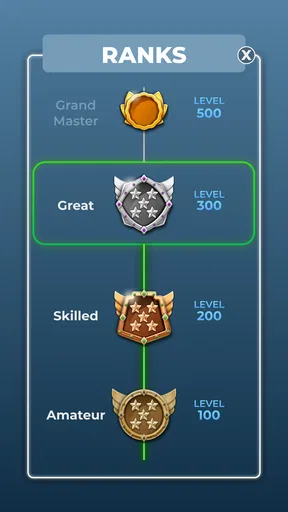

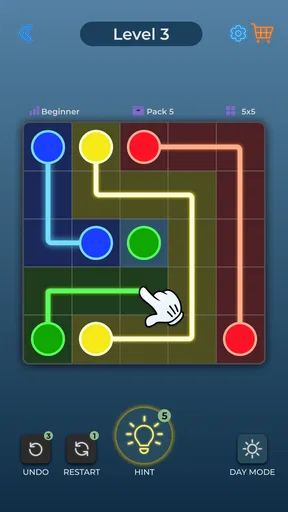
Our Review of Dot Link - Connect the Dots
 Analysis by Appyee
I spent time with Dot Link - Connect the Dots as a quick puzzle game for Android, and its appeal became clear almost immediately: it gives me a compact board, several colored dots, and one simple objective—pair matching colors by drawing paths between them. That sounds easy until the available space starts disappearing. Every connection has to fit without crossing another route, so a move that looks harmless can quietly make the rest of the board impossible.
That basic tension is why I can recommend it to people who enjoy visual logic puzzles but do not want a long story, complicated controls, or a large commitment every time they play. It is a free game from Bluetile, rated for Everyone, and it has built a very large audience, with over ten million installs, an average rating of 4.8 from around 701 thousand ratings, and about 14 thousand written reviews. Those figures suggest strong broad appeal, although popularity alone does not tell me whether its style will suit every puzzle fan.
The store describes it as a dots-connecting puzzle, but my experience is more specific than that label suggests. The real challenge is planning the board as a whole rather than chasing the nearest matching pair. I have to think about corridors, corners, empty spaces, and the order in which paths should be completed. The result is a game that feels approachable in the first few moments and increasingly demanding when I stop treating each color as an isolated problem.
How the puzzle works in everyday play
The controls are immediately readable. I select a colored dot and drag toward the dot of the same color, trying to create a continuous route. The board turns a familiar matching exercise into a space-management problem: paths need room, and the wrong early connection can block a color that seemed unrelated. This makes the game easy to explain to another person while still leaving room for genuine mistakes.
I find the best way to approach a board is to scan the edges first. A dot near a corner has fewer possible directions than one in the center, so it often deserves attention before a flexible central pair. I then look for narrow gaps that only one color can sensibly occupy. This is one of the less obvious strengths of the design: the winning move is often not the shortest path, but the route that preserves options for everything else.
That habit also makes the game useful in short, ordinary situations. If I am waiting for a coffee, sitting on public transport, or taking a brief break between tasks, I can open a puzzle and focus for a few minutes without needing to remember a plot or manage a collection. A small board can be a quick mental reset. A more awkward board can hold my attention longer, especially when I know I have made one early decision that needs reconsideration.
The game suits touchscreens well because the central action is direct rather than menu-heavy. I do not need to learn a complicated control scheme before solving anything. On the other hand, touch input can make precision important. If I drag too quickly or begin from the wrong point, I may create an unintended route and have to correct it. That is not a serious flaw, but it means a calm, deliberate finger movement works better than hurried tapping.
Why the difficulty comes from planning, not speed
There is no reason to approach these boards like an arcade challenge. The useful skill is visual prediction. Before committing to a path, I try to imagine how the remaining colors could travel around it. This changes the mood of the game: it is less about reacting and more about testing a small theory about the board.
One practical technique is to solve the most constrained pair first, then leave open routes for colors with more freedom. Another is to avoid filling the center too early. A central connection may look efficient, but it can split the board into sections and prevent a longer pair from reaching its destination. I also check whether a path can run along an outside edge before drawing it through the middle. These choices are more valuable than simply connecting whatever pair catches my eye first.
When I get stuck, I do not always erase the last move. Sometimes the problem began several connections earlier. Working backward helps me identify the first point where I reduced the board’s flexibility. That makes failure informative rather than merely frustrating. The puzzle teaches me to recognize bottlenecks, and that lesson carries from one board to the next even when the colors and positions change.
Still, players who prefer rapid rewards may find the pace restrained. This is not the right choice if I want constant action, dramatic effects, or a strong competitive rush. Its satisfaction comes from finding a clean solution, not from beating a timer or outperforming another player. People who enjoy classic logic puzzles will probably understand the appeal quickly; people who need a more expressive or story-driven experience may lose interest sooner.
Progress, pressure, and the role of spending
Dot Link - Connect the Dots is free to download, which removes the main barrier to trying it. That matters for a puzzle game because I can test the controls and difficulty without paying at the start. The game also carries in-app purchases ranging from $0.99 to $17.99 per item. Those are the purchase facts I would keep in mind before spending, especially if I expect to play regularly or want to remove friction from difficult moments.
I do not treat the presence of purchases as proof that the core puzzle is unfair. The important question is whether spending changes the intellectual challenge or simply offers convenience. From a fairness perspective, I would rather judge each purchase in context: if it helps me move past a board, it may reduce the satisfaction of solving that board myself; if it only supports optional convenience, the effect on puzzle integrity is smaller. The game is most rewarding when I use my own planning first and treat any assistance as a last resort.
That approach also protects the reason to play. A puzzle that I solve independently gives me a small sense of accomplishment. If I spend whenever a board becomes uncomfortable, I may progress, but I lose the useful struggle that makes the format engaging. My advice is to set a personal rule before playing: attempt a board several different ways, inspect the earliest questionable path, and only then consider whether a purchase is worth it.
The listed age rating is Everyone, so the basic concept is suitable for a broad audience. I can imagine it working well for a child who likes colors and matching, an adult looking for a quiet break, or an older player who prefers clear visual tasks. Younger players may still need help understanding why the shortest-looking connection is not always correct. The game is simple to start, but solving well requires patience and the ability to undo a tempting decision.
The current version is 3.0.1, and it runs on Android starting with version 7.0. That gives it a relatively wide reach across compatible Android devices. I would still pay attention to how comfortable the screen feels in practice: a small display can make tight paths harder to draw, while a larger screen gives more room to inspect the board. The puzzle rules do not become deeper because of a bigger phone, but the physical act of tracing can become less tiring.
Is the game fair for different kinds of players?
For me, fairness here is mainly about whether success remains connected to observation and planning. A well-designed dots puzzle should reward a player who notices constraints, not someone who reacts fastest or spends the most. This format naturally supports that kind of fairness because the board itself contains the problem. There is no need for a powerful character, a better loadout, or a faster device to understand the route.
That does not mean every player will experience the same pressure. A person who is comfortable with spatial reasoning may move through boards confidently, while someone who struggles to visualize paths may feel stuck much earlier. That difference is part of the genre rather than a sign of unequal competition. I appreciate that the game can be played privately, at my own pace, without forcing me to compare my result with another player.
The trade-off is that a mistake can feel self-inflicted. When I fail because I overlooked a blocked corridor, I know the board was asking me to plan more carefully. That is satisfying when I am in the mood for thought, but it can be irritating after a tiring day. The game has a quiet kind of pressure: not a countdown, but the growing awareness that each new line reduces the remaining space.
Compared with match-three games, this is more deliberate and less dependent on quick pattern reactions. Compared with crossword-style puzzles, it relies less on vocabulary and more on visual arrangement. Compared with elaborate brain-training collections, it focuses on one central mechanic instead of offering many unrelated exercises. I would choose this game when I want a narrow, repeatable logic task; I would choose another category when I want variety, narrative, competition, or a more energetic session.
It is also different from traditional paper mazes because the matching colors create several simultaneous obligations. I am not merely finding one route from an entrance to an exit. I am preserving enough open space for every pair on the board. That shared-space problem is what gives the game its identity and keeps the simple controls from becoming completely predictable.
What I would want to know before installing
The first question I would ask is whether it is genuinely free to try. Yes, the game is listed as free, so I can begin without an upfront purchase. I would remember that optional items are available inside the game, with individual prices between $0.99 and $17.99. Since spending can change how I approach difficult puzzles, I would decide in advance whether I want a strictly no-purchase experience or whether I am comfortable paying for selected conveniences.
The next question is whether it is suitable for a quick session. It is. The central interaction does not require a long setup, and a single puzzle can be approached whenever I have a spare moment. The more useful distinction is not session length but mental energy. A short board can still demand concentration, so this is a better break for someone who wants to think than for someone trying to switch their brain off completely.
Another concern is whether it needs a powerful phone. The minimum Android requirement is version 7.0, which makes the compatibility target broad. I would not choose a device based only on the number, though. Comfort depends on how easily I can see colored dots and draw accurately on the screen. If my phone has a cramped display or I often play while moving, the simple puzzle may feel more fiddly than it does at a desk or during a settled break.
Some readers will also wonder whether children can play it. The Everyone rating makes it broadly age-appropriate, and the rules are easy to demonstrate. I would still encourage younger players to treat failed attempts as part of the puzzle rather than immediately seeking help. A useful family routine would be to ask the child to explain which path caused the blockage. That turns the game from simple color matching into a small lesson in planning and consequences.
Finally, I would ask whether it is a good choice for someone who dislikes repetition. My honest answer is conditional. If the pleasure comes from refining a familiar rule and noticing new arrangements, the focused design can stay appealing. If I need new mechanics, characters, stories, or changing objectives to remain interested, the narrow format may feel repetitive. Its strength is concentration, and that same concentration is its main limitation.
Small habits that make harder boards manageable
I get better results when I pause before drawing anything. I look for pairs with only one realistic route, then consider whether that route divides the board. If it does, I compare the spaces on both sides rather than assuming the connection is automatically correct. This takes only a few seconds and prevents many avoidable restarts.
I also use a “future space” check. After imagining a connection, I ask whether every remaining color still has a plausible corridor. I do not need to map every line perfectly; I only need to notice obvious dead ends. This is more reliable than judging a path by distance. A longer outside route can be safer than a short line through the center.
When two options seem equally good, I prefer the one that leaves the most empty area between unrelated pairs. Open space is valuable because it gives later connections room to bend. This is a subtle but practical way to reduce pressure, and it explains why a board can suddenly become easy after one apparently indirect move.
For a relaxed daily routine, I would play without rushing and stop after a few frustrating attempts rather than turning the game into a chore. Returning later often helps because the board looks less tangled when I am no longer attached to the last failed idea. If I am introducing it to someone else, I would demonstrate the edge-first scan and let them discover the consequences of filling the middle too soon.
My trust verdict
Bluetile’s game earns my recommendation as a focused puzzle for people who enjoy connecting visual clues under spatial limits. Its free entry, Everyone rating, broad Android compatibility from version 7.0, and strong reception make it easy to try. The core experience is clear enough for casual players, yet thoughtful enough to reward people who study the whole board before acting.
I would not present it as a universal choice. It is not ideal for someone seeking a story, fast competition, or a constantly changing set of mechanics. I would also approach the in-app purchases deliberately: the available items cost from $0.99 to $17.99, and using them too quickly could weaken the satisfaction of solving a difficult layout. The fairest way to enjoy the game is to let planning remain the main source of progress.
After playing it, my strongest impression is that the simplicity is doing real work. Matching colors is familiar, but the limited board turns each line into a commitment. I like that the game can fit into a small break while still giving me something meaningful to think through. If that kind of quiet, visual problem-solving sounds appealing, Dot Link - Connect the Dots is worth trying; if you want spectacle or constant novelty, another puzzle style will probably serve you better.
Privacy and Permissions
See what permissions an app requests and how it handles your data.
- Wi-Fi connection information
- view Wi-Fi connections
- Other
- view network connections, full network access, control vibration, prevent device from sleeping
Verdict
Strengths of Dot Link - Connect the Dots
- Simple connect-the-dots gameplay that is easy to learn.
- Short levels make it suitable for quick breaks.
- Colorful visuals are pleasant and easy to follow.
- Increasing difficulty keeps later puzzles more engaging.
- Works well for players who enjoy casual brain teasers.
Limitations of Dot Link - Connect the Dots
- Some puzzles may feel repetitive after extended play.
- Hints or assistance may be limited on tougher levels.
- The game may be too simple for experienced puzzle fans.
- Progress can feel slow if levels are completed quickly.
- Ads may interrupt gameplay, depending on the version.
Other Releases by Bluetile
View All

Ball Sort Puz - Color Game
Puzzle4.8

Water Sort Puz - Color Game
Puzzle4.8

Domino Legends: Classic Game
Board4.7
Similar Picks in This Category
View All
Block Blast!
HungryStudio4.8

Braindom: Brain Games Test
Lahana Game Studio4.6

AMAZE!
CrazyLabs LTD4.6

Sudoku - Classic Sudoku Puzzle
Oakever Games4.7

Art Puzzle - Puzzle Games
Easybrain4.8

Amaze GO!
Oakever Games4.9
Frequently Asked Questions
What is Dot Link - Connect the Dots?
Dot Link - Connect the Dots is a casual puzzle game focused on linking matching colored dots on a grid. The objective is to connect every pair without leaving any space uncovered or allowing paths to overlap. It is easy to understand during the first levels, but later puzzles introduce larger boards and tighter layouts that require planning, careful observation, and efficient use of the available space.
How do you play Dot Link - Connect the Dots?
To play, select a colored dot and drag your finger across the grid until you reach the matching dot. Each path must remain inside the board, and the different colored connections generally cannot cross one another. You need to complete all pairs while filling the required cells. If a move creates a problem, you can usually undo it and try a different route instead of restarting the entire puzzle.
Is Dot Link - Connect the Dots suitable for children and beginners?
Yes, the game is accessible for beginners because its controls are simple and the early puzzles work as a gentle tutorial. Children can enjoy the color-matching concept, although the difficulty gradually increases and some boards may require patience or help with planning. Parents should still check the current age rating, advertising settings, and any in-app purchase information before allowing younger players to use it.
Can Dot Link - Connect the Dots be played offline?
Many of the core puzzles can typically be played without a continuous internet connection, which makes Dot Link convenient for short sessions while traveling or when mobile data is unavailable. However, features such as advertisements, analytics, updates, cloud-related services, or promotional content may require connectivity. Offline behavior can vary by device and app version, so it is worth testing after installation.
Does Dot Link - Connect the Dots contain ads or in-app purchases?
The game may use advertising as part of its free-to-play model, and some versions can also offer optional purchases, such as removing ads, obtaining hints, or unlocking additional content. The exact offers may differ between Android and iOS and can change after updates. Before downloading, review the store listing and payment settings, especially if the app will be used by children.
Play our best games!


